Sunday, 21 December 2014

High Resolution performance timer

I recently stumbled across this issue because I was trying to compile some code on an ARM based computer. There was code in the program I wanted to compile that uses assembly! I am not going to get into the details over which method might be faster or has higher resolution. From what I have learned this is the most compact and portable code to use if you want a high resolution counter that can be used for something like performance profiling.


This was the original code that was causing the issue. This code depends on the x86 instruction set.

#ifdef _WIN32
   unsigned long long tick;
   QueryPerformanceCounter((LARGE_INTEGER *)&tick); // works great on Windows ONLY
   return tick;
#else
 uint32_t hi, lo;
   __asm__ __volatile__ ("rdtsc" : "=a"(lo), "=d"(hi)); // Works well on x86 only
   return ( (uint64_t)lo)|( (uint64_t)hi)<< 32 );
#endif


Thanks to improvements on the POSIX based
int clock_gettime(clockid_t clk_id, struct timespec *tp);
 
We can replace our not portable assembly code for our easy to use clock_gettime code like so


#ifdef _WIN32
   unsigned long long tick;
   QueryPerformanceCounter((LARGE_INTEGER *)&tick); // works great on Windows ONLY
   return tick;
#else
   timespec timeInfo;
   clock_gettime(CLOCK_MONOTONIC_RAW, &timeInfo); // nanosecond resolution
   unsigned long long int nanosecs = ((unsigned long long)timeInfo.tv_sec)*1000000000  + 
                       ((unsigned long long)timeInfo.tv_nsec);
   return nanosecs;
#endif

Best of luck.

References:
  1. http://man7.org/linux/man-pages/man2/clock_gettime.2.html
  2. http://tdistler.com/2010/06/27/high-performance-timing-on-linux-windows
  3. http://en.wikipedia.org/wiki/High_Precision_Event_Timer

Sunday, 12 October 2014

Mesh Subdivision with the Loop Algorithm

Recently I have been learning more about Polygonal meshes and operations you can perform on them. One of the first operations that can be done on a mesh, that is a kind of cool, is subdivision. The basic idea is that you have a mesh that is very course (few polygons, rough) and we want a method that can construct a smoother mesh from this course mesh. This has been a popular method for constructing extremely smooth meshes for movies for many years.


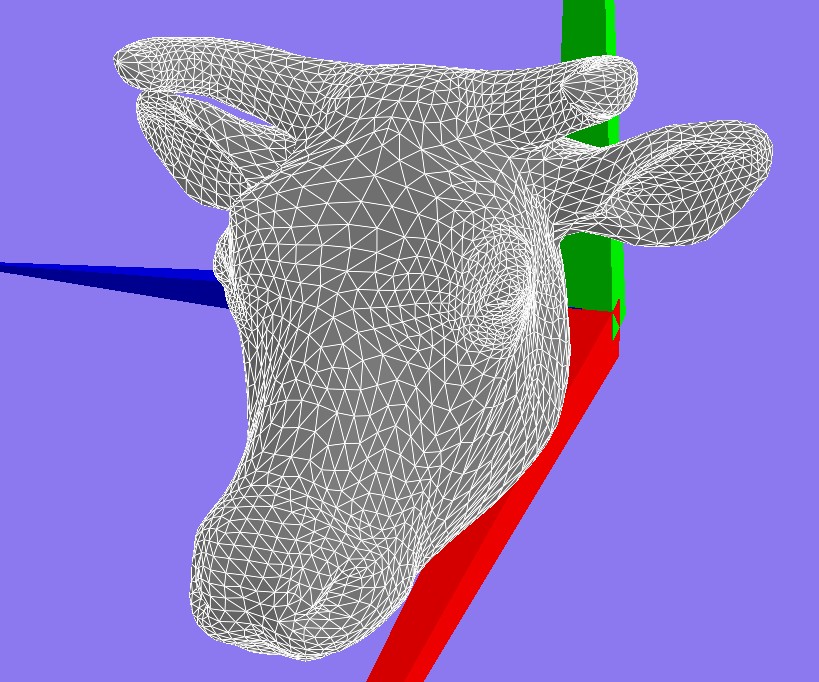
This is an example very course mesh of a Camel. This mesh was not constructed this way by chance. An artist spent many hours adjusting verticies (points) and faces (polygons or triangles) on this mesh in order for subdivision to work well.

The Loop algorithm is a popular algorithm to perform mesh subdivision. One reason for its popularity is that it ensures that after subdivision the mesh is C2 continuous (smooth second derivative on surface) everywhere on the mesh except for at extreme points.

After lots of careful thought I decided to implement the algorithm in 3 steps.
  1. Add all of the new verticies for the mesh (easy)
    1. Take every edge and add a new point between the two points that define the edge
  2. Construct/fix all of the polygons in the mesh (not so easy)
    1. Add edges between all of the new points and update the face/polygon labels for these edges
    2. Most bugs came from this step
  3. Compute the new positions of the verticies on a copy of the mesh from 2 (almost easy)
    1. Simply use the old mesh to compute all of the neighbours for old points. 
    2. Computed the weighted sum of positions from neighbours and selected point (See loop Algorithm) and assign this position on the mesh copy
    3. For new points I used the new mesh to get the neighbours of each new point that was in the old mesh
    4. Last I had to run a query to get the edge between the points from (3). This got me the edge I should use to find the last two neighbour points for the Loop Algorithm
The coding also assumes some knowledge of how to work with a half-edge data structure for the mesh.

original mesh


After one subdivision


After two

After three


final mesh

Camel mesh after simplifaction


References:
  1. http://www.cs.ubc.ca/labs/imager/tr/2014/CartelModeling/Cartel_website/
  2. https://www.graphics.rwth-aachen.de/media/papers/sqrt31.pdf
  3. http://research.microsoft.com/en-us/um/people/cloop/thesis.pdf

Saturday, 6 September 2014

Install SciPy on Mac OS


Way to many versions of python on Mac OS, but this seems to work.

Intstall homebrew
install gfortran
     brew install gfortran
     or
     brew install gcc
sudo easy_install scipy

References
  1. http://urinieto.com/2012/02/install-python-2-7-x-under-snow-leopard-lion-64-bits/
  2. http://stackoverflow.com/questions/11517164/scipy-numpy-matplotlib-troubles-on-osx
  3. http://brew.sh/
  4. http://docs.scipy.org/doc/numpy/user/install.html


Thursday, 14 August 2014

Spelling and Grammar Checking for Latex

One of the hurdles of starting to use Latex for document creation after getting used to Word is "is there spelling AND grammar checking?" I am happy to say there is a solution to this problem.

There are a few Latex editors already that have support for spell checking but grammar checking is another issue all together. In this post I am going to give a quick guide on a great Latex editor and how you can add grammar checking as well.

TexStudio is becoming a very popular latex editor. It works across many platforms including Windows, Linux and Mac. TexStudio also has built in support for being able to compile and display the document being worked on.

LangaugeTool is a very interesting tool that can be used as stand alone grammar checker. It works as a server on your computer and any system can send HTTP requests to it to ask if there are any grammar issues.

Here are the steps to get everything setup:

  1. Download the version of TexStudio that will work for your operating system.
  2. Install TexStudio
  3. Download LangaugeTool. It uses java so you will need Java available on you computer already.
  4. Unpack Language tool into some directory
  5. In TexStudio Configure TXS first, by using Options > Configure TexStudio… > Grammar like this:
    http://languagetool.wdfiles.com/local--files/checking-la-tex-with-languagetool/texstudio262.png
  6. If TexStudio is configured to use inline grammar checking (which is the default, see Options > Configure TexStudio… > Editor > Inline Checking > Grammar), you should see grammar checks immediately:
  7. After setting this up you should automatically start seeing grammer highlighting in your documents.


As a side note you can easily grab more spelling dictionaries for TexStudio.

Best of Luck.

References
  1. http://wiki.languagetool.org/checking-la-tex-with-languagetool#toc4

Tuesday, 3 September 2013

Generating Latex table of Matlab/Octave Matrix


I created some code in Octave/Matlab to generate latex table from matrix data. I created this because in my case I was tuning some data and algorithms for a paper I was writing and I loathed entering my data into the latex over and over in large tables.

The use just needs to supply a file descriptor, names for the table rows, column, the data matrix and if desired a wrapper to wrap the data entries from the matric in any specific formatting.


Example wrapper functions


function outstr = numWrapper(value)

outstr= strcat("\\num{" , num2str (value), "}");

endfunction
function outstr = ccolWrapper(value)
outstr= strcat("\\ccol{" , num2str (value), "}");
endfunction


This is the code used to generate the latex


%
% creates a latex style table from matrix data.
% wrapper is a function used to wrap the data in each cell
% can be used to apply more formatting in latex
%
% fid is the file pointer to the file to write to
% matrix is the data matrix that will be placed starting at row 1 column 1
% rowNames is a column vector of the string names to be inserted as the names for the rows
% size(rowNames,1) == size(columnNames,1)+1, i.e. the
% columnNames will be used to label each of the column in the data
% wrapper is a special function that will take your input data and wrap it with latex formatting
%
% Will look like
% latex table formatting
% columnNames[0] | columnNames[1] | columnNames[2] | columnNames[2] | ...
% rowNames[0] | matrix(0,0) | matrix(0,1) | matrix(0,2) | ...
% rowNames[1] | matrix(1,0) | matrix(1,1) | matrix(1,2) | ...
% .
% .
% .
%
%
%
%
% latex table formating
function fid = matrixToLatexTable(fid, matrix, rowNames, columnNames, wrapper )
fprintf(fid,'\\documentclass{article}\n');
fprintf(fid,'\\begin{document}\n');
fprintf(fid,' \\begin{tabular}{ |');
for col=1:size(matrix,2)+1
fprintf(fid,'c | ');
end
fprintf(fid,'}\n\\hline\n');
for col=1:size(columnNames,1)
if col==size(columnNames,1)
fprintf(fid,' %s', columnNames(col,:))
else
fprintf(fid,' %s & ', columnNames(col,:))
end
end
fprintf(fid,'\n \\\\ \\hline\n');
% now write the elements of the matrix
for r=1:size(matrix,1)
fprintf(fid,' %s & ', rowNames(r,:))
for c=1:size(matrix,2)
if c==size(matrix,2)
if true
fprintf(fid,'%s ',wrapper(matrix(r,c)));
else
fprintf(fid,'%f ', matrix(r,c));
end
else
if true
fprintf(fid,'%s & ',wrapper(matrix(r,c)));
else
fprintf(fid,'%f & ', matrix(r,c));
end
end
end
fprintf(fid,' \\\\ \\hline \n');
end
fprintf(fid,'\\end{tabular}\n');
fprintf(fid,'\\end{document}\n');
fclose(fid);
endfunction
 
 
Best of luck
- Glen 

Sunday, 19 May 2013

psycopg2 instering an array of polygons

This post is an example of how to insert an array of polygons into the Postgres database using Python and psycopg2.

The most important and problematic part of inserting a polygon array is the string formatting for the polygon[].

The first thing I tried was to just make a string for the exact syntax the Postgresql expects. This was not easy in my case. Probibly mostly because I was reading all of my data from a file and python would wrap qoutes around many of the changes I made in the file.

Next I found that psycopg2 will automatically turn a Python list into the proper syntax for ARRAY[] insertion. This would work great but some of the type checking between Python and psycopg2 lead to an error that the column you are trying to insert into is of type polygon not type text[].

Last I stumbled upon what worked for me. I had to turn the array of polygons into a python list just I could encapsulate the string in double quotes and lastly in the whole thing in single quotes.

Example:

Data:
    This is a list of axis aligned box polygons that I am inserting separated by ';'
((-7,-7),(-7,-5.6),(-5.6,-5.6),(-5.6,-7),(-7,-7));((-7,-2.8),(-7,-1.4),(-5.6,-1.4),(-5.6,-2.8),(-7,-2.8));((-7,-0),(-7,1.4),(-5.6,1.4),(-5.6,-0),(-7,-0));((-7,2.8),(-7,4.2),(-5.6,4.2),(-5.6,2.8),(-7,2.8));((-7,5.6),(-7,7),(-5.6,7),(-5.6,5.6),(-7,5.6));((-5.6,-5.6),(-5.6,-4.2),(-4.2,-4.2),(-4.2,-5.6),(-5.6,-5.6));((-5.6,-4.2),(-5.6,-2.8),(-4.2,-2.8),(-4.2,-4.2),(-5.6,-4.2));((-4.2,-5.6),(-4.2,-4.2),(-2.8,-4.2),(-2.8,-5.6),(-4.2,-5.6));((-4.2,-4.2),(-4.2,-2.8),(-2.8,-2.8),(-2.8,-4.2),(-4.2,-4.2));((-4.2,-2.8),(-4.2,-1.4),(-2.8,-1.4),(-2.8,-2.8),(-4.2,-2.8));((-4.2,4.2),(-4.2,5.6),(-2.8,5.6),(-2.8,4.2),(-4.2,4.2));((-4.2,5.6),(-4.2,7),(-2.8,7),(-2.8,5.6),(-4.2,5.6));((-2.8,5.6),(-2.8,7),(-1.4,7),(-1.4,5.6),(-2.8,5.6));((-1.4,-7),(-1.4,-5.6),(-0,-5.6),(-0,-7),(-1.4,-7));((-0,-7),(-0,-5.6),(1.4,-5.6),(1.4,-7),(-0,-7));((1.4,4.2),(1.4,5.6),(2.8,5.6),(2.8,4.2),(1.4,4.2));((2.8,-7),(2.8,-5.6),(4.2,-5.6),(4.2,-7),(2.8,-7));((4.2,5.6),(4.2,7),(5.6,7),(5.6,5.6),(4.2,5.6));((5.6,-5.6),(5.6,-4.2),(7,-4.2),(7,-5.6),(5.6,-5.6));((5.6,2.8),(5.6,4.2),(7,4.2),(7,2.8),(5.6,2.8))

After reading this from a file into a single string I used the following code to format it to psycopg2's liking.


            obstacles=valuesDict['box_obstacles'].split(";")
            obstacles_string = "{"
            for obstacle in obstacles:
                obstacles_string = obstacles_string + "\"" + str(obstacle) + "\","
               
            obstacles_string = obstacles_string[:-1] + "}"
            self._box_obstacles=obstacles_string

© 2013 Glen Berseth | www.fracturedplane.com

Postgresql: Calculate the number of polygon islands or overlapping groups

This post is about some work I did on how to calculate the number of number of groups of intersecting polygons in an array of polygons in Postgresql


First lets be a little more strict about what the definition of an island is. For the purposes of this algorithm an island consists of a set polygons where at least one polygon in the set overlaps another in the set.


I created a function to calculate the number of islands attached is the plpgsql code for the function.


CREATE OR REPLACE FUNCTION getNumIslands(polys polygon[]) RETURNS INT AS
$BODY$
DECLARE
islandList polygon[]; -- holds the set of obstacles that make up the current island.
islandCount INT; -- holds the count of the number of islands.
poly polygon; -- holds the polygon to start an island search
polys_copy polygon[]; -- A copy of the input list
inddex INT; -- keeps track of the current index in the polys_copy search

BEGIN
    
islandCount := 0;

islandList := polys;
polys_copy := polys;
inddex := 1;

WHILE array_length(polys_copy,1) > 0
LOOP
    -- RAISE NOTICE 'Poly_list length is: %', array_length(polys_copy, 1);
    -- grab the first poly
    poly := polys_copy[1];
    islandList := array_append(ARRAY[]::polygon[], poly);
    -- RAISE NOTICE 'Current island is %', islandList;
    -- remove the first poly because we dont care about it overlaping itself.
    polys_copy := polys_copy[2:array_length(polys_copy, 1)];
    
    -- Make a list of all the polys left that overlap with poly
    WHILE inddex <= array_length(polys_copy, 1)
    LOOP
        -- If the poly_copy overlaps the poly then add its index to the list
        -- of polys to be removed
        FOREACH poly IN ARRAY islandList
        LOOP
            IF polys_copy[inddex] && poly
            THEN
                islandList := array_append(islandList, polys_copy[inddex]);
                --
                IF array_length(polys_copy,1) = 1
                THEN
                    polys_copy := null;
                ELSE
                    polys_copy := polys_copy[1:inddex-1] || polys_copy[inddex+1:array_length(polys_copy, 1)];
                END IF;
                -- RAISE NOTICE 'Intersects with poly index: %', inddex;
                -- When a new intersecting poly is found it needs to be compared
                -- to every poly not just the polys left in the list
                inddex := 0;
                EXIT;
            END IF;
        END LOOP;
        -- RAISE NOTICE 'Current island is %', islandList;
        inddex := inddex + 1;
    END LOOP;
    
    islandCount := islandCount + 1;
    inddex := 1;
END LOOP;

RETURN islandCount;
                
END
                
$BODY$ LANGUAGE plpgsql;
© 2013 Glen Berseth | www.fracturedplane.com