Wednesday, 21 October 2015

Animation/Simulation System flow of control

Simulation for animation is no easy task. There are many steps when constructing an animation and figuring out when particular data should be instantiated can be tricky. I am going to go over one method I have been using to help organize the steps and structure that could be used to construct the simulation flow of control.


This is for a Simulation Engine that I have been using in my work.

The main steps in the Simulation engine
  1. init() (allocating libraries and structures)
    1. Create empty data structures
    2. Create spatial database
    3. Create planning domain
    4. Modules::init()
      1. Initialize any modules that are going to be used in the simulation
    1. At this point the libraries the user specified are loaded and some global structures are created. Some examples of global structures are the spatial database and the pathPlanning envirionment.
  2. initializeSimulation()
    1. Fill the global data structures
    2. Add all the obstacles to the simulation (All Static geometry and items)
      1. Must be in place before agents are reset/initialized.
  3. preprocessSimulation()
    1. Preconditions
      1. All obstacles should be loaded into the environment
    2. Preprocess all modules
    3. refresh the planning domain
    4. add agents to simulation 
    5. The simulation should be completely setup and ready for simulation.
  4. preprocessFrame()
    1. Store simulation data
    2. Maybe you want to collect some data on the performance of the simulation
  5. update()
    1. Step all of the modules in the system
  6. postprocessFrame()
    1. Update metrics from preprocessFrame
    2. Maybe save a picture or continue creating video
  7. postprocessSimulation()
    1. Collect data of metrics for simulation
    2. Do not remove or clear data yet. 
    3. Maybe write out data to file.
    4. This function is the best time to perform any kind of processing over data collected from the simulation.
  8. cleanupSimulation()
    1. Now data allocated data for the scenario can be reclaimed
    2. Here is when the data structures can be emptied and delete before now that any data collected from the simulation has been processed.
  9. finish()
    1. Now simulation components can be deleted because no more simulation will be done.

I find this separation of allocating objects and data structures and creation of items that go in the data structures very helpful. In helps avoid accidentally accessing data structures before they are done being created. It also helps define the ordering in which types of objects should be added to the simulation. As with any software you never really know what is going to be done with it in the future and I think this structure covers many unseen possibilities.

Monday, 4 May 2015

Handling Segfaults in Python that occur in custom C++ libraries

I am using a rather large C++ library to run some simulations. I have wrapped a function that calls this library which results in a large amount of processing. Very rarely and somewhat randomly the C++ library will segfault. It is not the point to debug the library because this simulation process views a segmentation similar to a failed test cases and the libraries scores will reflect this error.

Instead what I want to do is gracefully handle this segfault. The default behaviour in python is for the process to hang. Python is calling a library that runs a bunch of processing and python will wait until this function returns or a exception is thrown. However in the case I describe neither of these events occur.

Lets start with some basic C++ code:


extern "C" {

    int raise_a_fault(int r)
    {
        std::cout << "r is "<< r << std::endl;
        if (r > 3)
        {
            volatile int *p = reinterpret_cast(0);
            *p = 0x1337D00D; // force a segfault
            // raise(SIGSEGV); // this was not effective enough
        }
        else
        {
            return r;
        }
    }
}  

This C++ library function will force a segmentation fault if r is greater than 3.

I am using the ctypes library from python to link to the C++ library


from ctypes import cdll
lib = cdll.LoadLibrary('./libFoo.so')
from multiprocessing import Pool 
 
def raise_a_fault(dummy):
    return lib.raise_a_fault(dummy)          
      
p = Pool(1)
items = [1, 2, 3, 4, 5]
results = p.map(raise_a_fault, items) 

print results

This script will terminate with "Segmentation fault (core dumped)". raise_a_fault() will not return anything and the interpreter will exit. Now instead what if I want to run this over a number of processes to speed up processing time.


from ctypes import cdll
lib = cdll.LoadLibrary('./libFoo.so')
from multiprocessing import Pool  
def raise_a_fault(dummy):
    return lib.raise_a_fault(dummy)  
 
p = Pool(1)
items = [1, 2, 3, 4, 5, 4, 3, 2, 1, 10, 2]
results = p.map(raise_a_fault, items) 
print results

This will never terminate. The subprocess used in the pool with fault and exit without returning a value and the map function will wait, patiently, for a return value. For me I can't even end the script with crtl+c. I have to use ctrl+z which ends up leaving a orphaned process behind.

One supposed solution is to add a new signal handler to check for Segmentation fault signals

from ctypes import cdll lib = cdll.LoadLibrary('./libFoo.so')
from multiprocessing import Pool  
def raise_a_fault(dummy):
    return lib.raise_a_fault(dummy)  
 
def sig_handler(signum, frame):
    print "segfault"
    return None 
signal.signal(signal.SIGSEGV, sig_handler)
 
p = Pool(1)
items = [1, 2, 3, 4, 5, 4, 3, 2, 1, 10, 2]
results = p.map(raise_a_fault, items) 
print results


This still has some odd issues. There seems to be some race condition that leads the processes to consume the resources of the processor but the processes do not advance. It might have something to do with this bug bug. Generally passing signals to child processes is tricky business in Python. Child processes will ignore signals when they are busy processing worker functions. I have seen suggestions to instead add a timeout on to the call to p.map().(timeout=1). This had no effect for me.

A different solution that I have used before has more promise. This solution involves replacing map with apply_async(). In this case non of the signal handling is needed.


from ctypes import cdll lib = cdll.LoadLibrary('./libFoo.so')
from multiprocessing import Pool  
 
def print_results(result):
    print "callback result: ***************** " + str (result)
 
def raise_a_fault(dummy):
    print "raise_a_fault, pid " + str(os.getpid())
    try:
        return lib.raise_a_fault(dummy)
    except Exception as inst:
        print "The fault is " + str(inst)
        # ctypes.set_errno(-2)
 
processes_pool = Pool(2)
print "main, pid " + str(os.getpid())
items = [1, 2, 3, 4, 5, 4, 3, 2, 1, 10, 2]

try:
    for item in items:

        try:
            # this ensures the results come out in the same order the the experiemtns are in this list.
            result = processes_pool.apply_async(raise_a_fault, args = (item, ), callback = print_results)
            result.get(timeout=1)
        except Exception as inst:
            print "The exception is " + str(inst)
            continue
    processes_pool.join()
    
except Exception as inst:
    print "The Out exception is " + str(inst)
 
print "All Done!" 

The output:


main, pid 23466
raise_a_fault, pid 23467
r is 1
callback result: ***************** 1
raise_a_fault, pid 23468
r is 2
callback result: ***************** 2
raise_a_fault, pid 23467
r is 3
callback result: ***************** 3
raise_a_fault, pid 23468
r is 4
The exception is
raise_a_fault, pid 23467
r is 5
The exception is
raise_a_fault, pid 23475
r is 4
The exception is
raise_a_fault, pid 23479
r is 3
callback result: ***************** 3
raise_a_fault, pid 23483
r is 2
callback result: ***************** 2
raise_a_fault, pid 23479
r is 1
callback result: ***************** 1
raise_a_fault, pid 23483
r is 10
The exception is
raise_a_fault, pid 23479
r is 2
callback result: ***************** 2
The Out exception is
All Done!


This method is almost great. We have the output we want but we have to use a timeout. Some, including myself, don't want to have to specify a definitive timeout where we expect the processing to be complete. It is not easy to find a nice solution to this problem, there are some bugs that make catching segfaults difficult.

Unfortunately, this story has a tragic end. There does not seem to be good support for trapping SIGSEGV or many other signals in Python. I also tried some options in the C++ code. You can change how signals are handled in the C++ code but all that can effectively be done is to raise another signal. Useful exceptions can not be throw from a signal handler because they are essentially on a different stack frame. The solution presented seems to work the best. It does have the added benefit that processes do not crash. By not crashing I am referring to having the process exit() resulting in the process pool reduce the number of processes in the pool which could eventually lead to no processes available.

The code I used to play around with possible solutions can be found here.

References:
  1. https://docs.python.org/3/library/ctypes.html
  2. http://stackoverflow.com/questions/1717991/throwing-an-exception-from-within-a-signal-handler

Friday, 1 May 2015

Knowledge vs Information

I have spent a far bit of time in the education system and I feel there is a great difference between knowledge and information. The internet is full of information, tons of small independent pieces of data. When you are at school you spend most of your time learning rules that you can reuse. Learning becomes the process of gluing your information together using the knowledge you have.


As a graduate student I feel that I create so much information and I never have enough time to study it.

Wednesday, 18 March 2015

Install eclipse plugins via the command line

I am always a fan of making features usable on the command line. I use Ubuntu a bunch and one task I started was to write a script to install all of may favourite packages I like. One of the packages I love it Eclipse. It gives me the same experience across operating systems. Has many features for many different programming languages.

I asked myself today "I wonder if I can install eclipse plugins on the command line?" The amount of plugins I like to have installed in eclipse is numerous. From PyDev to SubClipse to CDT. Having to go in and select all of these each time is time consuming. As well having to add in the new repos for plugins outside of the standard version repo was also annoying. It turns out you can very easily install eclipse plugins with the command line

The Basic syntax is


eclipse -application org.eclipse.equinox.p2.director -repository < repo_link > -installIU < plugin > 


To find the plugin names in eclipse to go Help -> Install New Software -> Select a repo -> select a plugin -> go to More -> General Information -> Identifier;


Here is an example list of command in a script that installed many of the features I use.


    eclipse -application org.eclipse.equinox.p2.director -repository http://download.eclipse.org/releases/juno/ -installIU org.eclipse.cdt.feature.group/
    eclipse -application org.eclipse.equinox.p2.director -repository http://download.eclipse.org/releases/juno/ -installIU org.eclipse.egit.feature.group
    eclipse -application org.eclipse.equinox.p2.director -repository http://download.eclipse.org/releases/juno/ -installIU org.eclipse.cdt.sdk.feature.group
    eclipse -application org.eclipse.equinox.p2.director -repository http://download.eclipse.org/releases/juno/ -installIU org.eclipse.linuxtools.cdt.libhover.feature.group
    eclipse -application org.eclipse.equinox.p2.director -repository http://download.eclipse.org/releases/juno/ -installIU org.eclipse.wst.xml_ui.feature.feature.group
    eclipse -application org.eclipse.equinox.p2.director -repository http://download.eclipse.org/releases/juno/ -installIU org.eclipse.wst.web_ui.feature.feature.group
    eclipse -application org.eclipse.equinox.p2.director -repository http://download.eclipse.org/releases/juno/ -installIU org.eclipse.wst.jsdt.feature.feature.group
    eclipse -application org.eclipse.equinox.p2.director -repository http://download.eclipse.org/releases/juno/ -installIU org.eclipse.php.sdk.feature.group
    eclipse -application org.eclipse.equinox.p2.director -repository http://download.eclipse.org/releases/juno/ -installIU org.eclipse.rap.tooling.feature.group
    eclipse -application org.eclipse.equinox.p2.director -repository http://download.eclipse.org/releases/juno/ -installIU org.eclipse.linuxtools.cdt.libhover.devhelp.feature.feature.group
    eclipse -application org.eclipse.equinox.p2.director -repository http://download.eclipse.org/releases/juno/ -installIU org.eclipse.linuxtools.valgrind.feature.group
    eclipse -application org.eclipse.equinox.p2.director -repository http://download.eclipse.org/releases/juno/ -installIU org.eclipse.egit.feature.group


#Subclipse

    eclipse -application org.eclipse.equinox.p2.director -repository http://subclipse.tigris.org/update_1.10.x -installIU org.tigris.subversion.subclipse.feature.group
    eclipse -application org.eclipse.equinox.p2.director -repository http://subclipse.tigris.org/update_1.10.x -installIU SVNKit

#PyDev
eclipse -application org.eclipse.equinox.p2.director -repository http://pydev.org/updates -installIU org.python.pydev.feature.feature.group
eclipse -application org.eclipse.equinox.p2.director -repository http://pydev.org/updates -installIU org.python.pydev.mylyn.feature.feature.group 


Best of luck.

References:
  1. http://help.eclipse.org/indigo/index.jsp?topic=%2Forg.eclipse.platform.doc.isv%2Freference%2Fmisc%2Fupdate_standalone.html

Monday, 9 March 2015

Crowd Simulation Lecture

I recently gave a lecture on Crowd simulation. This lecture outlines some of the popular steering algorithms and then some of my work on making them even better via parameter optimization. You can find the presentation here.

Take care.

Sunday, 21 December 2014

High Resolution performance timer

I recently stumbled across this issue because I was trying to compile some code on an ARM based computer. There was code in the program I wanted to compile that uses assembly! I am not going to get into the details over which method might be faster or has higher resolution. From what I have learned this is the most compact and portable code to use if you want a high resolution counter that can be used for something like performance profiling.


This was the original code that was causing the issue. This code depends on the x86 instruction set.

#ifdef _WIN32
   unsigned long long tick;
   QueryPerformanceCounter((LARGE_INTEGER *)&tick); // works great on Windows ONLY
   return tick;
#else
 uint32_t hi, lo;
   __asm__ __volatile__ ("rdtsc" : "=a"(lo), "=d"(hi)); // Works well on x86 only
   return ( (uint64_t)lo)|( (uint64_t)hi)<< 32 );
#endif


Thanks to improvements on the POSIX based
int clock_gettime(clockid_t clk_id, struct timespec *tp);
 
We can replace our not portable assembly code for our easy to use clock_gettime code like so


#ifdef _WIN32
   unsigned long long tick;
   QueryPerformanceCounter((LARGE_INTEGER *)&tick); // works great on Windows ONLY
   return tick;
#else
   timespec timeInfo;
   clock_gettime(CLOCK_MONOTONIC_RAW, &timeInfo); // nanosecond resolution
   unsigned long long int nanosecs = ((unsigned long long)timeInfo.tv_sec)*1000000000  + 
                       ((unsigned long long)timeInfo.tv_nsec);
   return nanosecs;
#endif

Best of luck.

References:
  1. http://man7.org/linux/man-pages/man2/clock_gettime.2.html
  2. http://tdistler.com/2010/06/27/high-performance-timing-on-linux-windows
  3. http://en.wikipedia.org/wiki/High_Precision_Event_Timer

Sunday, 12 October 2014

Mesh Subdivision with the Loop Algorithm

Recently I have been learning more about Polygonal meshes and operations you can perform on them. One of the first operations that can be done on a mesh, that is a kind of cool, is subdivision. The basic idea is that you have a mesh that is very course (few polygons, rough) and we want a method that can construct a smoother mesh from this course mesh. This has been a popular method for constructing extremely smooth meshes for movies for many years.


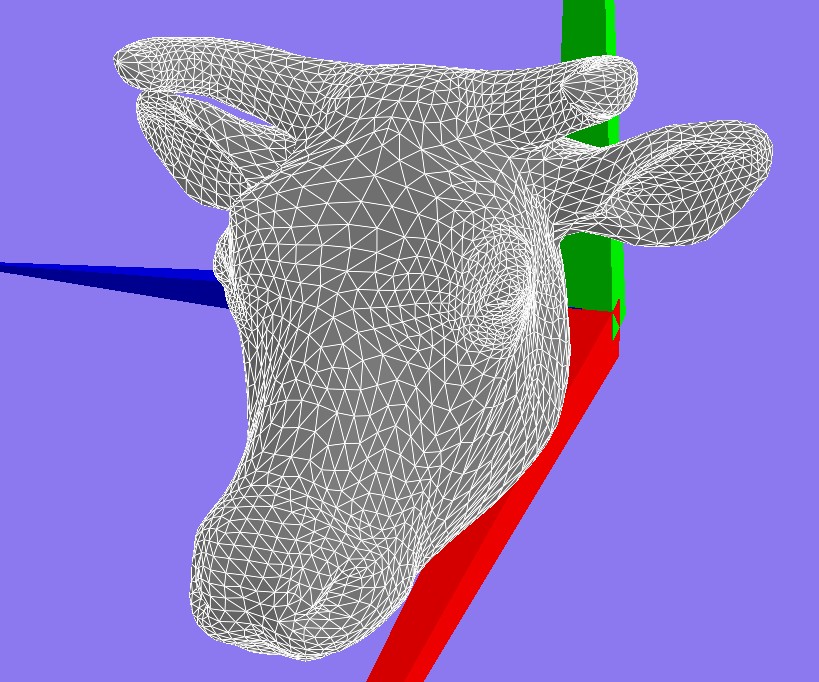
This is an example very course mesh of a Camel. This mesh was not constructed this way by chance. An artist spent many hours adjusting verticies (points) and faces (polygons or triangles) on this mesh in order for subdivision to work well.

The Loop algorithm is a popular algorithm to perform mesh subdivision. One reason for its popularity is that it ensures that after subdivision the mesh is C2 continuous (smooth second derivative on surface) everywhere on the mesh except for at extreme points.

After lots of careful thought I decided to implement the algorithm in 3 steps.
  1. Add all of the new verticies for the mesh (easy)
    1. Take every edge and add a new point between the two points that define the edge
  2. Construct/fix all of the polygons in the mesh (not so easy)
    1. Add edges between all of the new points and update the face/polygon labels for these edges
    2. Most bugs came from this step
  3. Compute the new positions of the verticies on a copy of the mesh from 2 (almost easy)
    1. Simply use the old mesh to compute all of the neighbours for old points. 
    2. Computed the weighted sum of positions from neighbours and selected point (See loop Algorithm) and assign this position on the mesh copy
    3. For new points I used the new mesh to get the neighbours of each new point that was in the old mesh
    4. Last I had to run a query to get the edge between the points from (3). This got me the edge I should use to find the last two neighbour points for the Loop Algorithm
The coding also assumes some knowledge of how to work with a half-edge data structure for the mesh.

original mesh


After one subdivision


After two

After three


final mesh

Camel mesh after simplifaction


References:
  1. http://www.cs.ubc.ca/labs/imager/tr/2014/CartelModeling/Cartel_website/
  2. https://www.graphics.rwth-aachen.de/media/papers/sqrt31.pdf
  3. http://research.microsoft.com/en-us/um/people/cloop/thesis.pdf